How to take a mock test: a step-by-step guide for students
Find the right paper, read the instructions, use the exam screen like the real JEE or NEET, understand the marking, and turn every wrong answer into marks. Then sit open exams and the Live Series with students everywhere.

22 October 2026 · 7 min read · All posts by StemPy Lab
A mock test is a rehearsal. You sit a full paper, under the clock, the way the real exam will feel. Then you find out what you know, what you only thought you knew, and what to do next.
This guide shows you every step on StemPy Lab. We follow a demo student, Asha, who is preparing for JEE Main. Asha and every number in this guide are made up.
1. Find the right paper
Open Mock Tests from the menu.
- Tell us what you are preparing for. Near the top, answer What are you preparing for? Asha picks JEE Main. Papers and live exams for JEE Main now come first, here and on her dashboard.
- Pick a shelf. Papers are grouped by exam and subject, for example JEE Main · Physics.
- Open a paper. Its page shows the time, the number of questions, the marking and the sections.
Your class tests from your teacher and the open exams you registered for are on the same page, once they start.
2. Read the instructions
Press Start and an instructions page opens. The clock has not started yet. Read it without hurry: the time, the marking, the sections, how each kind of question is answered, and the rules.
Before you begin:
- Sit somewhere quiet, with your phone or laptop charged.
- Silence calls and notifications. Leaving the exam screen is counted.
- Keep a pen, paper and the things the real exam allows.
Tick I have read and understood and press Begin the test. Now the clock runs.
3. Use the exam screen
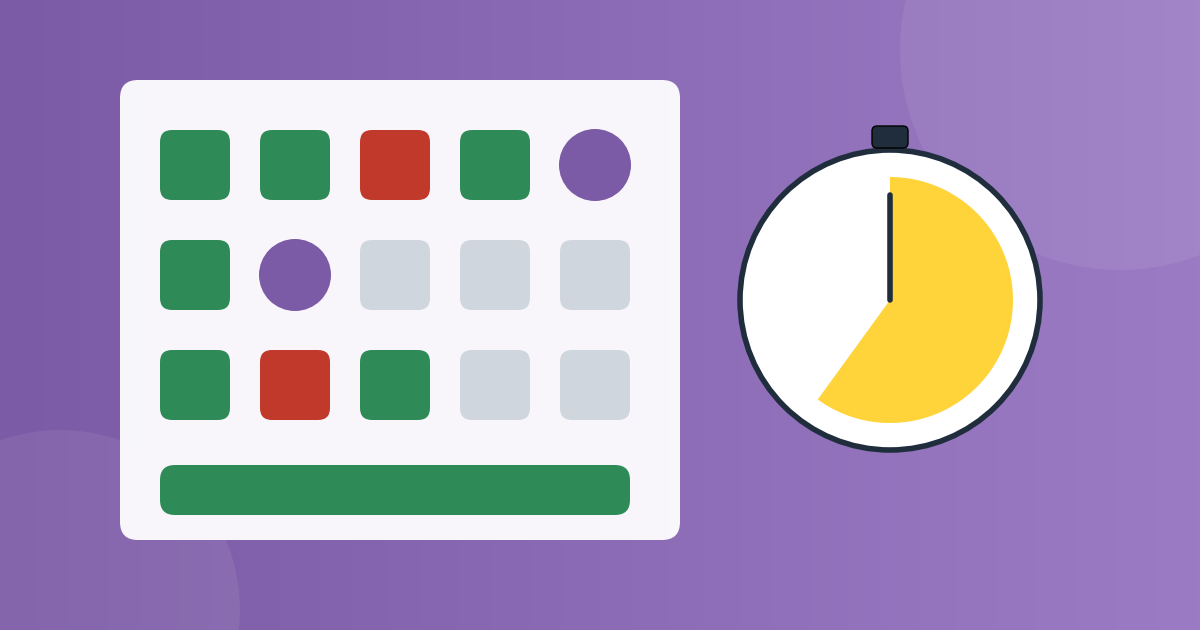
The screen works like the online JEE and NEET. One question is on screen at a time, and the palette beside it shows every question by colour.
- Choose an answer. It is saved the moment you choose it.
- Save & Next goes to the next question. Press any number in the palette to jump straight to it.
- Mark for Review & Next puts a purple circle on a question you want to see again. An answered question that is marked still counts.
- Clear Response takes your answer back. A question with no answer scores 0.
- Watch the colours. Green is answered, red is seen but not answered, grey is not seen yet, purple is marked.
A good way through a paper is three rounds. First, answer everything you are sure of and mark the rest. Second, come back to the marked ones. Third, use the last minutes for the hardest ones, and decide whether a guess is worth the penalty.
Some papers have sections (Physics, Chemistry, Maths). If a section has its own clock, you take the sections one after another, and you cannot go back to a section once it closes.
The clock runs on our server. Reloading the page gives no extra time, and loses nothing: your answers are saved.
4. Know how you are marked
Many papers are marked like the real exam: +4 for a right answer, −1 for a wrong one, and 0 for a blank. Here is Asha's paper.
Every wrong answer costs a mark, and an answer left blank costs nothing. So is a guess worth it? A blind guess among four options gains only a quarter of a mark on average, and three times out of four it loses one. Rule out two options first, and a guess between the last two gains one and a half marks on average. So guess when you can rule options out, not blindly.
Some questions have several correct options: tick every one you think is right. Some ask you to type a number: it is right if it is close enough to the answer.
5. Keep to the rules
- Copying and printing are switched off, and your name is shown faintly on the page.
- Each time you leave the test (another tab, another app, a call) it is counted and timed. Your teacher or the organiser can see it.
- In an exam, leaving too often holds your attempt out of the ranks until someone reviews it. If there was a good reason, such as a power cut, you can appeal once from your result page.
6. Submit
When you are done, press Submit test. A summary shows how many you answered, left and marked, so you can go back before you confirm. If the time runs out first, your saved answers are submitted for you.
7. Read your result
This is where the learning happens. Do not just look at the score and close the page.
- Your marks and percentage, and each section on its own. Asha's Electricity section is her weakest.
- Every question, with your answer, the right answer and the explanation. Read the explanation even for the ones you got right: you may have been right for the wrong reason.
- The time you spent on each question. Two minutes on one easy question is a warning.
- In an open exam, your place among everyone who took it.
8. Turn mistakes into marks
Every question you get wrong goes into My mistakes by itself, as soon as your result is out. It stays there until you get it right.
There is one exception. Questions from a locked paper, such as a live exam or a private class test, do not go in. You can still go through them, with the right answers and the explanations, on your result page.
- Open My Question Vaults from the Practice menu or your dashboard.
- Open My mistakes and press Practise. You get a quick test made from your own wrong answers.
- Get one right and it leaves the list. Get it wrong again and it stays, and comes back next time.
You can also keep any question in a vault of your own with Add to vault, for example Physics, revise before the exam. In a result, Select the ones I missed picks every wrong answer at once.
9. Sit an open exam with everyone
An open exam is a paper that everyone sits at the same time, with a rank and often a certificate at the end. They are listed on the Mock Tests page.
- Register on the exam's page. Some exams need an access code from the organiser, or a fee paid to them.
- On the day, keep the exam's page open. It counts down and opens the paper at the start.
- After it ends, see your score, the right answers and your place. Equal marks share a place.
- Get your certificate, if the exam gives them: Participation for everyone, Merit for the top tenth.
- Think an answer in the key is wrong? Some exams let you object within a few hours, from your result page.
10. The Live Series
StemPy Lab runs free exams on a timetable, for example a JEE Main Physics paper every Sunday. Press Join the series and you are registered for every sitting.
- Each sitting gives points: 10 for taking part, and up to 90 more by where you finish.
- The series' page has standings for the week, the month and all time. The month's top three get a trophy on their profile.
- Add the timetable to your calendar puts every sitting in your calendar, with a reminder.
- After a sitting, the paper becomes a free practice paper.
A week of practice
Here is how Asha uses one week.
- Monday: one practice paper, timed, in one sitting.
- Tuesday: read the whole result. Note the topics that cost marks.
- Wednesday and Thursday: study those topics. Practise My mistakes.
- Friday: a short question set on the weakest topic.
- Sunday: the Live Series paper, with everyone else.
Then look at My performance on your dashboard. It shows your scores over time and your strong and weak topics.
For every button on the exam screen, the Help centre has a full guide.
If something does not work as this guide says, write to us on the Contact page.
Discussion (0)
Log in to join the discussion.
Loading…
How to hold a mock test: a step-by-step guide for teachers
Get your questions ready, build a paper marked like the real exam, choose how it starts, run it, read the report and give certificates. Then take the same paper to students beyond your class with an open exam. A walk through a demo class test.
Mock testsTeachersGuides